OPSEC Basics - Operational Security for Privacy
Opsec basics privacy comes down to one idea: assume everything you do online leaves a trail, then systematically close each gap. Good operational security isn't one big action — it's a set of habits that individually seem small but stack up into real protection. Most people who get compromised don't fail at cryptography. They fail at discipline.
What Operational Security Actually Means
OPSEC started as a military concept in the Vietnam War — the U.S. realized that North Vietnamese forces were predicting operations by collecting small pieces of individually harmless information. The same principle applies online. Your Tor usage is one data point. Your timezone in a forum post is another. Your writing style is another. None of them compromise you alone. Together, they build a profile.
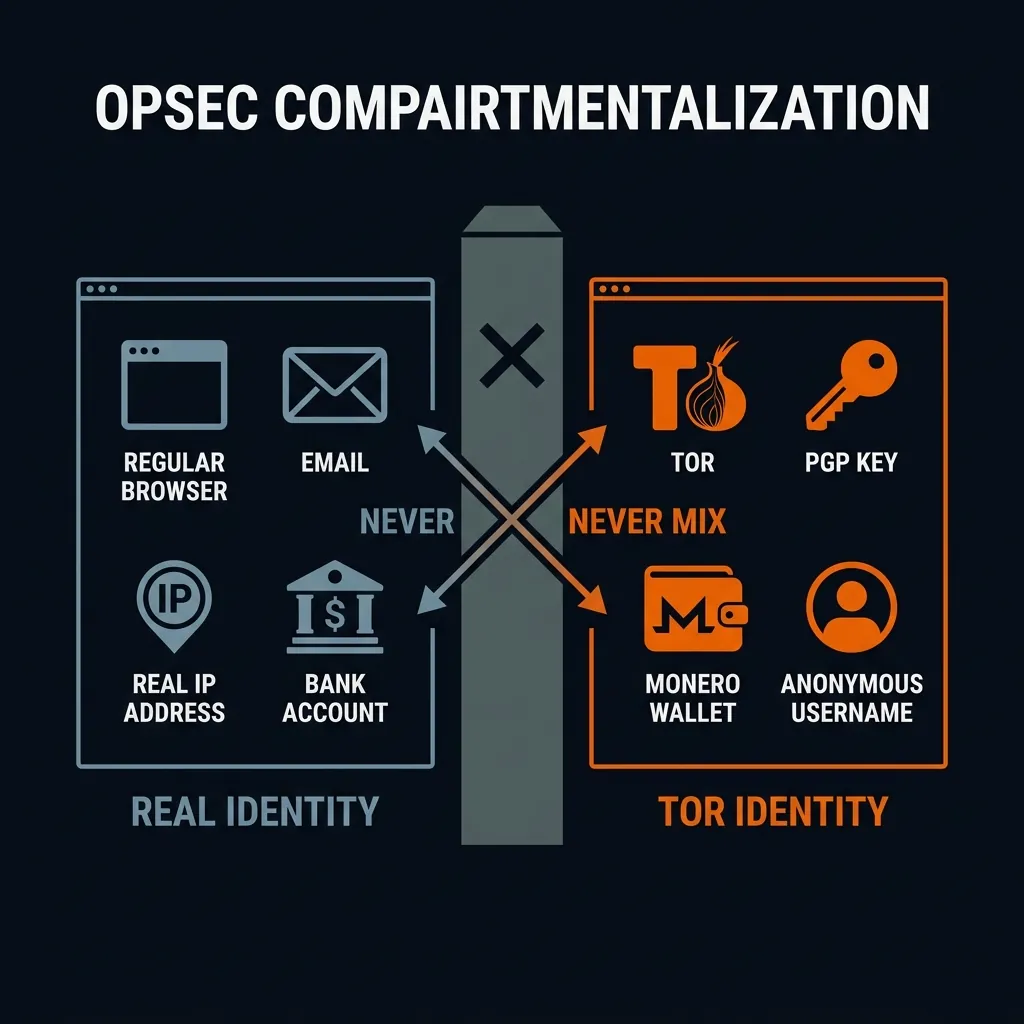
Applied to privacy on the Tor network, opsec basics privacy means compartmentalization — keeping different activities in separate containers so that a failure in one doesn't leak into another. Your real identity in one box. Your Tor activity in another. Never let the two touch.
PGP Verification Step by Step
This is the single most important opsec skill for anyone using Tor marketplaces. PGP signature verification tells you whether an address was actually published by the person who controls the market's private key. No clone operator can forge that.
Here's the process. Install GPG (it comes with Tails, or install Gpg4win on Windows, or use the gpg command line on Linux). Import the marketplace operator's PGP public key — get it from a source you already trust. Not from the same site where you found the address. If the key and the address come from the same place and that place is a clone site, both are fake.
Download the operator's latest canary statement. This is a signed message that includes the current verified address and a timestamp. Run gpg --verify canary.txt. If GPG outputs "Good signature from [operator name]," the address in that canary is authentic. If it says "BAD signature" — do not use that address. Something is wrong.
Whole thing takes 90 seconds once you've done it before. First time might take ten minutes while you set up GPG. Worth it. This one habit protects you from every fraudulent clone across every market, including DrugHub onion links and any other Tor marketplace you use.
Tor Browser Configuration for Privacy
Default Tor Browser settings are good enough for most people. But there are a few adjustments worth knowing about.
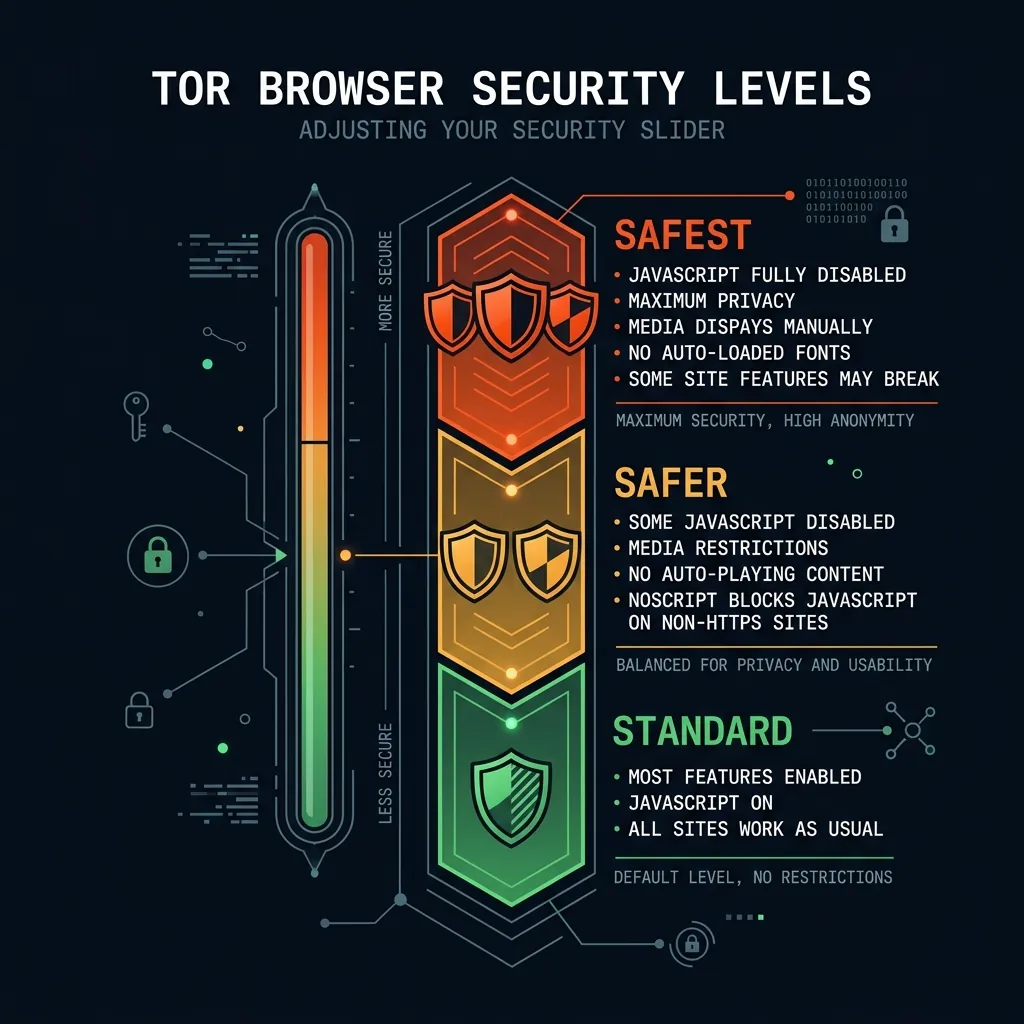
Security level: set it to "Safer" or "Safest" in Tor Browser preferences. "Safest" disables JavaScript entirely, which prevents 83% of known browser exploitation techniques documented by Google's Project Zero in 2025. Some sites won't work without JavaScript, but for security-sensitive browsing, the trade-off is worth it.
Don't resize the Tor Browser window. Window size is a fingerprinting vector — if your browser window is an unusual size, it narrows down who you might be from millions of Tor users to a much smaller pool. Tor Browser sets a default window size specifically to make all users look the same.
Never use Tor Browser and a regular browser simultaneously on the same network for related activities. If you log into your email in Chrome and browse a marketplace in Tor Browser, your ISP can correlate the timing of traffic on both connections. Using a VPN and Tor privacy comparison setup can mitigate some of these risks, but compartmentalization is the stronger defense.
Metadata Exposure and How to Limit It
Metadata is the data about your data. The content of your message might be encrypted, but the fact that you sent a message, when you sent it, and the size of it — that's metadata. And it's often enough.
Timezone leaks. If you post on a forum at consistent times, someone can narrow down your timezone. Some forum software includes timezone data in your profile by default. Check it. Set it to UTC or a timezone that isn't yours.
Writing style analysis. Stylometry — analyzing writing patterns to identify authors — has been used in criminal investigations. Your sentence length, vocabulary choices, punctuation habits, and spelling errors create a fingerprint. If you use the same writing style across a clearnet identity and a Tor identity, the two can potentially be linked. Vary your style consciously, or use a different language register for different identities.
Screenshot metadata. If you take a screenshot and share it, the image file might contain your screen resolution, OS information, and timestamp. Strip EXIF data from any image before sharing it online. Tools like ExifTool or MAT2 handle this.
Common Operational Security Mistakes
Reusing usernames across platforms. If your forum handle on a clearnet site matches your handle on a Tor forum, that's a direct link between your identities. Use unique, randomly generated names for every platform.
Logging into personal accounts while Tor is running. Even if you're using separate browsers, DNS leaks or traffic correlation can connect the sessions. Complete separation means separate devices or at minimum separate virtual machines.
Trusting a single source for market addresses. Clone operators set up convincing-looking verification sites. Use at least two independent sources and PGP signature validation before trusting any address. Our DrugHub Market page is one source — cross-reference with the operator's own signed canary for independent verification.
Skipping updates. Tor Browser updates patch known vulnerabilities. Running an outdated version exposes you to exploits that have already been documented and possibly weaponized. Update immediately when a new version is available. Security reports from 2025 documented at least two cases where outdated Tor Browser versions were exploited through known bugs.
Building a Sustainable OPSEC Routine
The best operational security setup is one you'll actually follow consistently. An elaborate system that you abandon after two weeks is worse than a simple system you maintain every day. Start with the basics: PGP verification on every address, fresh Tor Browser sessions for sensitive activity, unique identities per platform, and no cross-contamination between your real identity and your Tor activity.
Add layers gradually. Tails OS instead of Tor Browser on your regular machine. A dedicated device for sensitive activity. Monero instead of Bitcoin (see our cryptocurrency privacy analysis for why that matters). Each layer incrementally reduces your exposure. But the fundamentals — PGP verification, compartmentalization, no metadata leaks — do most of the work.
The opsec basics privacy practices described here apply universally. They protect you regardless of what you're doing on the Tor network, which marketplace you're interacting with, or which endpoint you're connecting to. They're also the foundation for understanding why the onion routing architecture works and where its limitations are.
Frequently Asked Questions About OPSEC
Is Tails OS necessary for good OPSEC?
Tails provides defense in depth by routing all traffic through Tor and leaving no trace on the host machine after shutdown. It's the strongest single-tool privacy solution available. But it's not strictly necessary for everyone. Tor Browser on a clean system with good compartmentalization habits covers most threat models. Tails adds protection against local forensics and system-level compromises that Tor Browser alone doesn't address.
How do I know if my OPSEC has been compromised?
Often, you don't — that's the hard part. Monitor for anomalies: unexpected login attempts, accounts flagged for unusual activity, or information appearing in places you didn't put it. PGP canary monitoring is one way to detect compromise at the service level — if a marketplace's canary goes silent, something changed. At the personal level, regular password rotation and checking for leaked credentials in breach databases are baseline maintenance.